




Memory-driven follow-up
Good estimates wait in the CRM until a salesperson remembers which customer needs another touch.
Open estimates are still revenue
Run timely, approved follow-up around every open quote so the customer gets a useful next step and your team sees exactly what needs attention.
Connect supported estimate context, messaging, and proof so quoted work keeps moving without forcing the sales team into another CRM.
See how a connected workspace helps your team keep good opportunities moving toward booked work.
The quote is not the end of the sale
Your team already earned the lead, ran the call, diagnosed the need, and built the estimate. Revenue disappears when the next useful touch depends on memory.
Good estimates wait in the CRM until a salesperson remembers which customer needs another touch.
Generic “checking in” texts ignore the job, option, timing, proof, and objection behind the quote.
Follow-up keeps firing after a reply, approval, booking, opt-out, or status change and damages trust.
Managers cannot see who was contacted, who replied, what stopped, or which estimates still need attention.
What Close Forge changes
Close Forge turns eligible quotes into visible queues with approved timing, useful context, stop conditions, ownership, and a clear path back to a human.
The next opportunity is already in motion
Start with Close Forge, prove the first workflow, and add the rest of the TradeVulcan stack only where it creates a better customer or operator outcome.
One estimate. Three chances to restart the sale.
Close Forge helps the team deliver the right next touch, recognize when the customer engages, and stop automation the moment a human should take over.
Find the right quotes
Supported estimate context, age, status, value, job type, and workspace rules determine what belongs in the active queue.
Deliver a useful next step
Approved SMS and email steps can answer common hesitation, resurface value, and make it easy to continue the conversation.
Stop and hand off
The sequence stops when the configured condition is met and the responsible person gets the history needed to close the loop.
Build the first repeatable win
Start with the leak costing the business today. Keep the current systems, define the controls, and expand only after the first path works.
See the real product
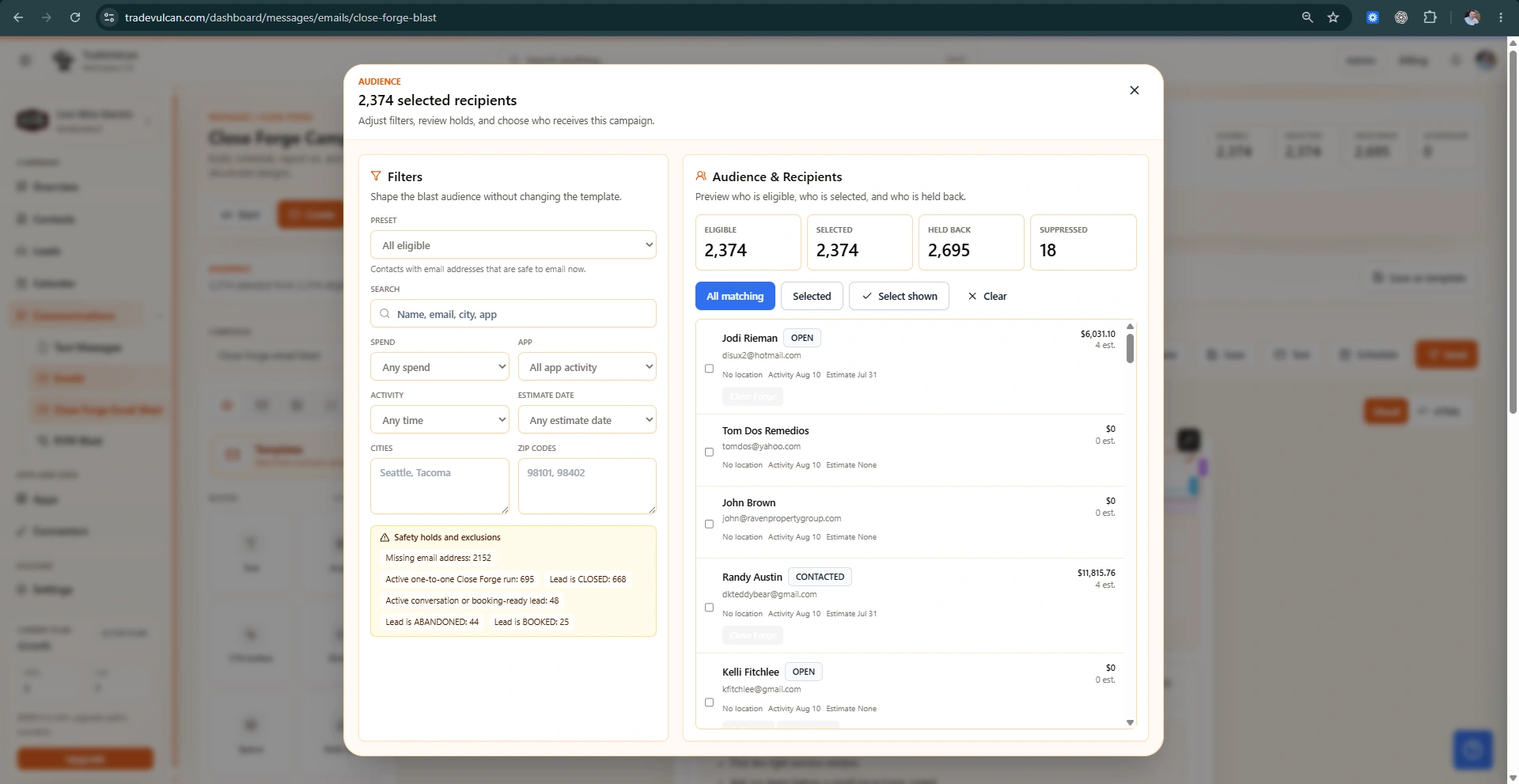
Review the screens used to choose the audience, build the workflow, monitor active opportunities, and understand where quoted revenue is moving.
Before and after Close Forge
Close Forge supports the estimating system your team already uses and adds the timing, visibility, and safeguards that manual follow-up usually lacks.
Follow-up lives in calendars, sticky notes, and memory.
Eligible quotes enter a visible, timed recovery queue.
Every customer receives the same “checking in” message.
Approved touches can reflect estimate context, timing, and proof.
Messages continue after the customer replies or buys.
Configured replies, wins, bookings, and opt-outs stop the sequence.
Managers guess which estimates were worked.
Sends, replies, stops, owners, and recovery status stay visible.
Owner view
What the workflow creates
What owners actually get
The objective is a consistent recovery motion that helps salespeople act at the right moment and helps managers see whether open quotes are actually being worked.
Give every eligible estimate an approved follow-up path instead of relying on individual memory.
Catch renewed interest and route the customer back to a person while the conversation is active.
Use delays, send windows, opt-outs, replies, status changes, and stop conditions to protect the experience.
See active queues, history, ownership, recoveries, and the estimates that still need human attention.
Built around the estimating process you already run
Start with the open-estimate leak, prove the follow-up process, and connect proof, reporting, or AI only where it improves the sale.
Persistent without becoming annoying
Managers control who is eligible, when messages can send, what content is approved, which events stop the sequence, and who owns the response.
Estimate age, status, value, job type, and eligibility rules
Approved SMS and email templates with send windows
Reply, opt-out, booking, approval, won, and manual stop conditions
Queue ownership, escalation, audit history, and human review
Automation with an accountable owner
Configure the customer experience, operator ownership, connector actions, messaging, and review rules around the way your business actually runs.
Close Forge FAQ
Make the recovery process dependable without giving automation unlimited authority.
Yes. Close Forge shows active follow-up work, message history, stops, replies, and opportunities that need attention.
Write-back behavior depends on the connector and workspace configuration. The buyer-facing workflow can launch with safe follow-up and internal history first.
The estimate is already earned
Add Close Forge to your TradeVulcan stack and turn forgotten estimates into visible, controlled opportunities for the team to recover.