
 ServiceTitan
 Housecall Pro
 OpenAI
 TradeVulcan
Phone-only websites make customers wait
A homeowner on a mobile phone may not be ready to call, sit on hold, or explain everything again. Without another path, the visit ends.
Your website traffic is already paid for
Site Spark gives every visitor a live path forward: ask a question, book in your CRM, continue by text, call your office, or become a tracked lead your team can actually work.
Tell us what is happening and choose the next step that works for you.
Direct actions depend on connector access, CRM plan, messaging readiness, and deployment settings.
The click was expensive. The dead end is optional.
You pay to get the homeowner onto the page. Then most websites ask them to call during business hours or drop their name into an inbox. Site Spark opens a faster path while intent is still high.
A homeowner on a mobile phone may not be ready to call, sit on hold, or explain everything again. Without another path, the visit ends.
A name and email land in a shared inbox with no service context, booking status, owner, or reliable next step.
The customer is ready to act at 9:00 PM, but the office does not see the opportunity until the next morning.
Visitors ask a question, start a form, or open the scheduler and leave before your team receives anything useful.
The visitor sees a phone number or vague form, leaves, and becomes invisible.
The visitor can ask, book, text, or become a recoverable lead while intent is still high.
One website. Four ways forward.
The visitor does not have to behave one specific way. Site Spark can answer, schedule, move to SMS, or capture a structured lead without losing the context already gathered.
Site Spark answers the first question, understands the service need, and asks one useful question at a time so the customer does not hit another dead end.
Your website should do more than collect clicks
Add Site Spark to your current website and CRM without rebuilding the entire customer journey from scratch.
From website intent to booked work
Site Spark keeps the source, service need, customer details, channel, scheduling context, and final outcome connected through the entire conversion path.
Capture the source
Site Spark can preserve the page, placement, referral, campaign, and available UTM context behind the interaction.
Understand the need
AI-assisted chat identifies the service need, urgency, estimate intent, and the next useful question without restarting the conversation.
Choose the channel
The customer can stay in site chat or move the same service conversation to SMS when texting is enabled and consented.
Book the work
Configured services, service-area rules, customer details, address checks, and available windows support direct booking in ServiceTitan or Housecall Pro.
Save the opportunity
When a booking cannot complete, Site Spark can preserve the customer and context as a lead, notify the team, and make the next action visible.
The visitor should not have to start over
Site Spark creates one connected path across the website, text messaging, scheduling, and the CRM instead of leaving each channel in a separate inbox.
Web chat that can continue by text
When web-to-SMS is enabled, messaging is ready, and the visitor provides consent, Site Spark can continue the same service conversation by text. The customer does not have to repeat the issue, the schedule preference, or the work already completed.
Smart forms that create real work
Site Spark forms collect the information your team needs to qualify and follow up, preserve the page and campaign that produced the request, and create a structured TradeVulcan lead with optional CRM actions.
Contact, estimate, coupon, and maintenance templates
Multi-step fields with service and consent logic
Address validation and spam protection
Page, referral, UTM, GCLID, and FBCLID context
Create or update a tracked TradeVulcan lead
Optional customer, location, and lead creation in the CRM
Book directly into the CRM
Site Spark can use the configured service, customer, location, address, appointment window, and CRM mappings to create the booking in ServiceTitan or Housecall Pro. If the live write cannot safely complete, the opportunity can fall back to a lead instead of disappearing.
When live booking cannot complete, the customer and service context can still become a lead for human follow-up.
See what your website almost lost
Your team can review the source page, contact details, service need, transcript, selected timing, CRM outcome, and the sessions that still need a next step.
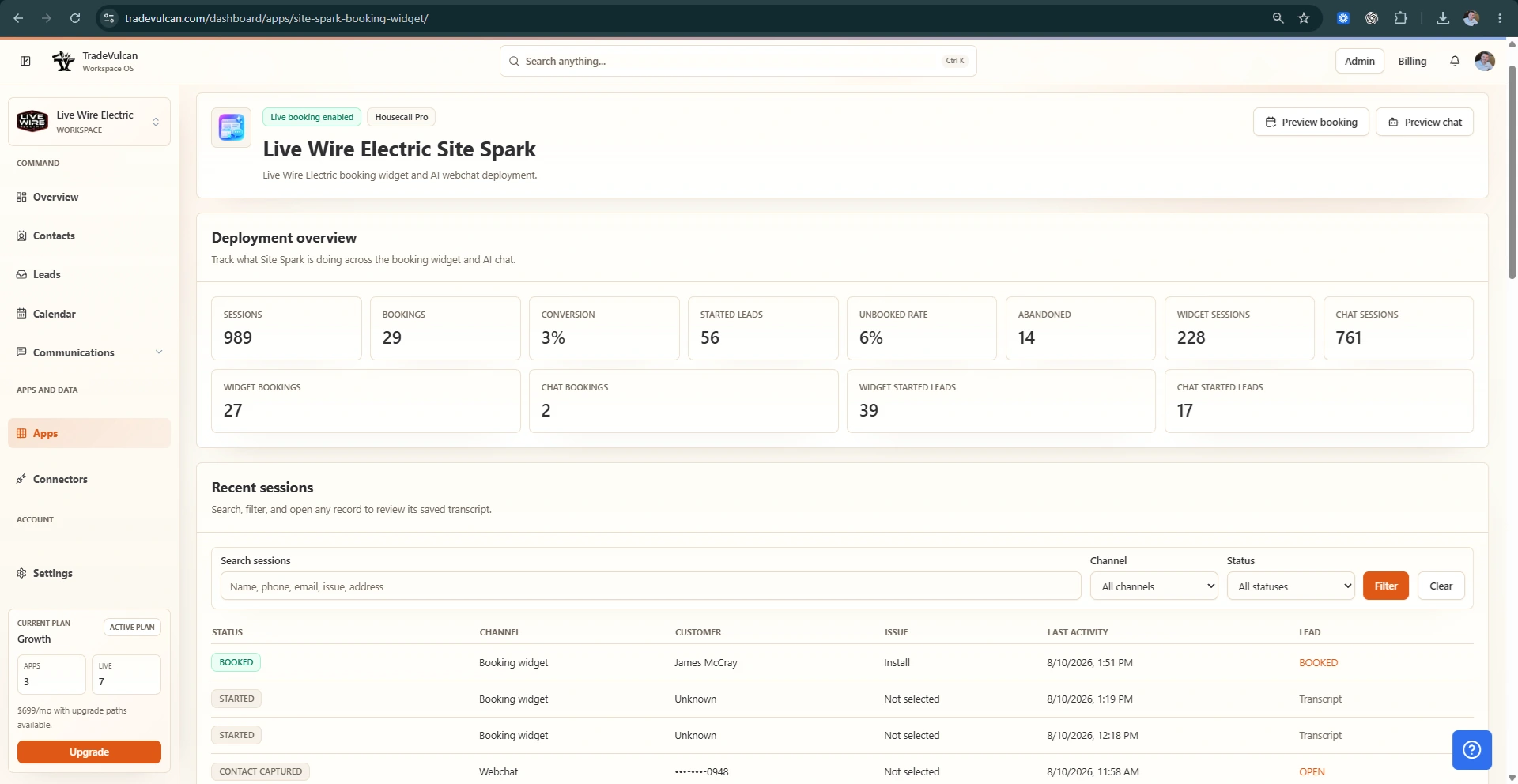
What owners actually get
Site Spark is built to reduce friction between “I need help” and the next real action your business can see, own, and measure.
Give visitors a clear choice to ask, book, text, call, or submit instead of forcing everyone through one high-friction path.
AI-assisted chat can acknowledge the customer and move the service conversation forward while the office is closed.
Smart forms create structured, trackable work instead of relying on someone to notice another email in the inbox.
Customer, service, address, timing, campaign, and booking context can stay attached to the opportunity your team works.
The next visitor is already looking
Start with guided booking, AI site chat, connected forms, or the full Site Spark experience.
Automation with contractor controls
Configure the services, geography, schedule, consent, escalation, and fallback rules around the way your office actually operates.
Configured service categories and job mappings
Service-area and address validation
Business hours, booking windows, and 24/7 rules
SMS consent, opt-out, suppression, and send readiness
Human escalation for safety, billing, complaints, or requests
Lead fallback and team notification when booking cannot complete
Site Spark FAQ
Add a better conversion path without replacing the website, CRM, phone number, or office team you already have.
No. Site Spark is designed to install on the website you already have. It adds guided booking, AI-assisted site chat, smart forms, and optional text continuation without requiring a full website rebuild.
Yes, when live booking is enabled and the connector has the required access. Site Spark supports direct booking workflows for ServiceTitan and Housecall Pro, including configured service, customer, location, and appointment details. Available actions depend on the CRM, plan, permissions, and deployment configuration.
Yes. When web-to-SMS handoff is enabled, the customer has provided consent, and messaging is ready, Site Spark can continue the same service conversation by text instead of making the customer start over.
Site Spark can preserve usable contact and service context as a lead, record the session outcome, and notify the team for follow-up. The exact fallback depends on the information collected and the workflow settings.
Site Spark forms can collect structured service and consent information, validate addresses, track source context, create or update a lead, notify the team, and optionally create customer, location, or lead records in a supported CRM. They are built to create operational work, not just send another email.
The AI helps understand the request and write the next conversational response. Deterministic application workflows handle address checks, customer lookup, service-area rules, available windows, consent, and CRM creation so the system does not invent availability or claim a booking that did not happen.
Your next website visitor is already looking for an easy way to say yes
Add Site Spark to your current website and turn questions, form fills, after-hours visits, and booking intent into work your team can see and move forward.