





Conflicting reports
CRM dashboards, spreadsheets, accounting reports, and manager math tell different versions of performance.
One operating view for the whole team
Vulcan Score normalizes CRM and business data into explainable scorecards, goals, leaderboards, and manager views people can trust.
Normalize supported CRM, accounting, and TradeVulcan activity into scorecards, leaderboards, goals, and manager-ready signals.
See how a connected workspace helps your team keep good opportunities moving toward booked work.
The business already has the data
Teams stop acting on dashboards when formulas conflict, reports arrive late, source facts are hidden, or nobody can explain why the score changed.
CRM dashboards, spreadsheets, accounting reports, and manager math tell different versions of performance.
The team learns about missed goals at the end of the month instead of seeing pace while action can still matter.
A score changes, but managers cannot see the definition, source facts, exclusions, or data-health warning behind it.
Managers spend the meeting assembling reports instead of using the time to coach the next behavior.
What Vulcan Score changes
Vulcan Score syncs supported facts, normalizes the definitions, calculates snapshots, surfaces data health, and delivers role-based scorecards the team can understand.
The next opportunity is already in motion
Start with Vulcan Score, prove the first workflow, and add the rest of the TradeVulcan stack only where it creates a better customer or operator outcome.
One source of truth. Three steps to trusted performance visibility.
Vulcan Score separates source facts from calculations and presentation so managers can review confidence before using the numbers operationally.
Sync source facts
Jobs, revenue, estimates, calls, departments, people, dates, and accounting context are synced before dashboards calculate.
Calculate snapshots
Metric definitions, mappings, exclusions, freshness, and health checks stay visible behind each scorecard snapshot.
Deliver the view
Owner dashboards, manager scorecards, leaderboards, goals, and TV displays make current performance easier to coach.
Build the first repeatable win
Start with the leak costing the business today. Keep the current systems, define the controls, and expand only after the first path works.
See the real product
Review the screens used to understand operating metrics, inspect confidence, compare teams, and put current performance where people can act on it.
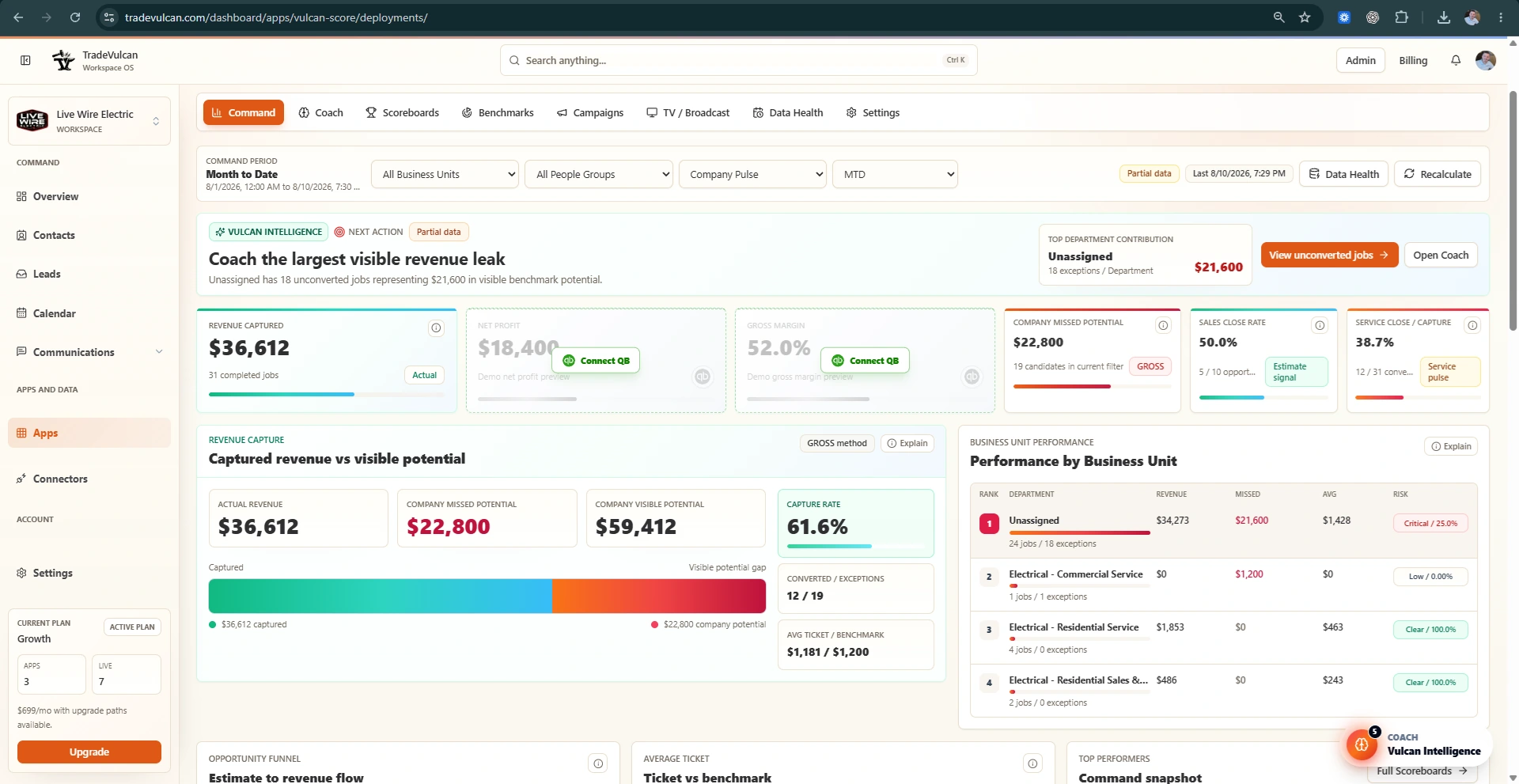
Before and after Vulcan Score
Vulcan Score does not hide source limitations behind a pretty dashboard. It creates a reviewable path from connected facts to the number the team sees.
Managers pull raw reports from several systems.
Supported facts are normalized into a shared metric layer.
Spreadsheet formulas live with one person.
Definitions, mappings, exclusions, and confidence are reviewable.
Performance is discussed after the month is over.
Current pace, goals, and team signals stay visible throughout the period.
Leaderboards show a number with no explanation.
Managers can inspect drilldowns, source freshness, and data-health context.
Owner view
What the workflow creates
What owners actually get
The objective is faster operating review, clearer coaching, shared definitions, visible confidence, and less time rebuilding the same reports every week.
Give owners and managers one documented explanation of what each KPI includes and excludes.
See whether teams and departments are ahead, behind, or at risk while there is still time to respond.
Move from a score to the activity, trend, source, and next behavior a manager can coach.
Put role-appropriate scorecards, leaderboards, and TV views where performance stays present.
Built around the systems that already record the work
Start with the metrics the business already trusts, validate the first sync, and expand the scorecard only after the underlying facts and formulas are approved.
Scorecards should motivate, not mislead
Managers control mappings, metric definitions, benchmark periods, goals, visibility, rewards, and whether the data is healthy enough for operational use.
Connector, department, business-unit, job-type, and employee mapping
Formula definitions, exclusions, benchmark periods, and snapshot history
Data freshness, confidence, reconciliation, and health review
Role-based scorecard, leaderboard, TV display, and reward visibility
Automation with an accountable owner
Configure the customer experience, operator ownership, connector actions, messaging, and review rules around the way your business actually runs.
Vulcan Score FAQ
Confirm the facts and formulas before the numbers become part of the culture.
No. It syncs source facts first, then calculates explainable snapshots for dashboards and TV displays.
Review data health, formula notes, and manager approval settings before tying KPIs to rewards or contests.
No. Vulcan Score syncs CRM data into normalized fact tables first, then calculates explainable KPI snapshots that dashboards and TV displays read.
The next operating decision deserves a trusted number
Add Vulcan Score to your TradeVulcan stack and turn scattered CRM and business data into explainable scorecards, goals, and coaching signals.