A WordPress alternative.Build the business. Not the plugin stack.
You need a website that sells your services—not another system to assemble. Web Spark brings planning, specialized AI agents, design approvals and hosting into one guided contractor website workflow.
Multi-agent website teamService & city page planningLive previewManaged hosting
One connected contractor ecosystem.Start with Web Spark. Build the next layer around your business.
Built for the work you doHVACPlumbingElectricalRoofingHome services
The TradeVulcan advantage
Choose a guided website team instead of assembling the whole build yourself.
Choose Web Spark for the workflow—not just another feature on the shortlist.
01
Trade the blank starting point for a blueprint
A flexible CMS gives you choices. Web Spark gives you a structured starting process. Map the pages, service areas and conversion paths before the design begins so the project starts with a business plan instead of a theme search.
02
Coordinate copy, design and site structure
Work with agents focused on conversion copy, search architecture, imagery, connections and review. Direct the website through clear approvals and a live preview rather than managing every specialty as a separate part of the project.
03
Put conversion tools on the same roadmap
Plan Site Spark booking, chat and smart forms alongside Proof Pulse reviews and job content. Connect the website to the way your office handles leads, not just to a list of installed features.
A closer look
Web Spark vs WordPress
WordPress is an open-source content-management system with an extensive theme and plugin ecosystem. Web Spark offers a guided, multi-agent website-building and hosting workflow inside TradeVulcan.
Compare the product focus and operating workflow
What you are choosing
Web SparkThe TradeVulcan approach
WordPressProduct focus
What you are choosing
A guided website team and managed workflow
An open-source CMS and extensible toolkit
Project starting point
Service, location and customer-journey blueprint
Themes, content structure and your chosen build approach
Building the site
Specialized AI agents, approvals and live preview
Your team, agency, themes, plugins and developer tools
Hosting approach
Web Spark hosting within the website workflow
Hosting provider and maintenance approach you select
Conversion layer
Connected Site Spark, Proof Pulse and Call Spark apps
Website functionality assembled through your chosen tools
From your business idea to your next growth channel.
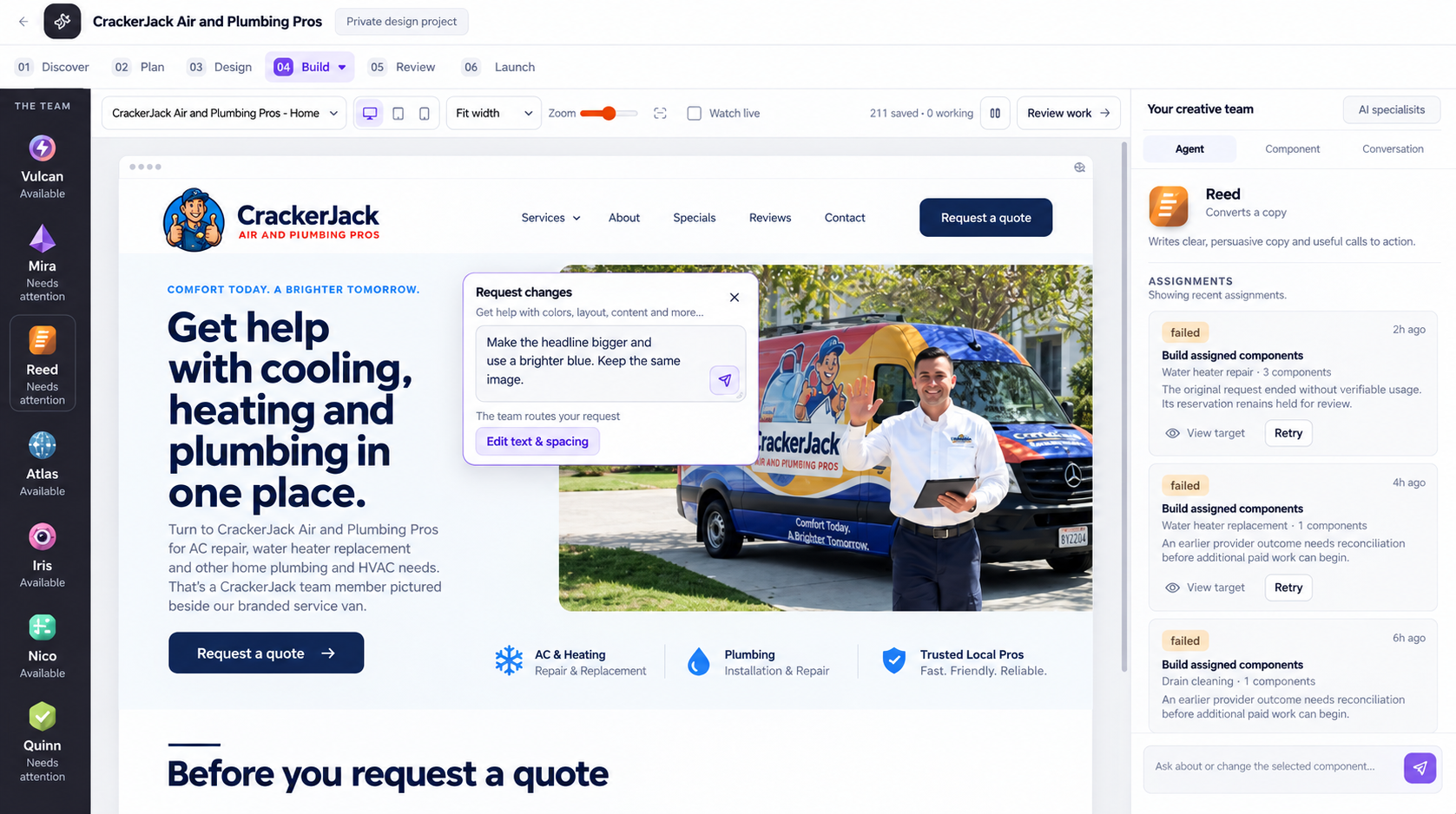
Work with Vulcan, Reed, Atlas, Iris, Nico and Quinn through a guided blueprint, design and build process. Keep the website connected to the tools that turn visitors into customers.
TradeVulcan / Web SparkProduct preview
Web Spark AI website studio with a business prompt, agent team and live website preview. Explore Web Spark
01
Plan the site that sells your services
Define your service mix, locations, page structure and customer journeys before the build begins.
02
Direct a real website workflow
Approve the blueprint and design direction, then work through the build with a visible preview and specialized agents.
03
Connect the conversion layer
Add Site Spark booking, chat and forms, Proof Pulse job proof, and Call Spark phone workflows around the finished site.
WordPress is a strong foundation for teams that want a highly extensible CMS and the freedom to build around it. But a contractor choosing a website is often trying to solve a different problem: get the services explained, cover the market, show credible work and make it easy for customers to book or call. Owning every decision in the software stack is not always the goal.
Web Spark takes a guided approach. Start with the blueprint, approve the design direction and work with a specialized agent team while watching the site take shape. Bring hosting and conversion planning into the same project. The reason to choose Web Spark is not that WordPress cannot build a contractor site. It is that Web Spark gives your team a focused way to get that work done.
Better together
Start here. Grow into the rest.
Every next step does not need another disconnected vendor. Build around Web Spark with the TradeVulcan apps that solve your next problem.
Start with a content and URL plan for your current site. Decide what to keep, improve and redirect before designing the replacement.
Bring the current workflow
Show us the tools, handoffs and customer moments you want to improve.
See your TradeVulcan approach
Walk through Web Spark using the needs of your business, not a generic tour.
Build the right starting plan
Choose the scope, connections and rollout steps that fit your operation.
Questions before the switch
WordPress alternative FAQs
The details that matter when you put Web Spark on your shortlist.
Is Web Spark a WordPress plugin?
No. Web Spark is a website-building app inside TradeVulcan with its own guided planning, design, build and hosting workflow. It is an alternative approach to creating your next contractor website.
Do I need to choose and maintain a collection of plugins?
Web Spark does not start with a WordPress plugin stack. Plan the site within its guided workflow and choose connected TradeVulcan apps for booking, chat, forms, job proof and calling.
Can I use TradeVulcan tools on a WordPress website I keep?
Yes. Site Spark and Proof Pulse have website-integration workflows, including WordPress options. You can improve an existing website’s conversion and proof without making a Web Spark rebuild your first project.
How should I scope a WordPress replacement?
Bring your existing pages, service areas, best content and customer journeys. Map what should be retained, improved and redirected as part of the new-site plan. Choose the page package and hosting after the scope is clear.
Make the next move count
Build the business. Not the plugin stack.
See Web Spark around the way your business actually works. Bring your current setup. Leave with a better plan.