
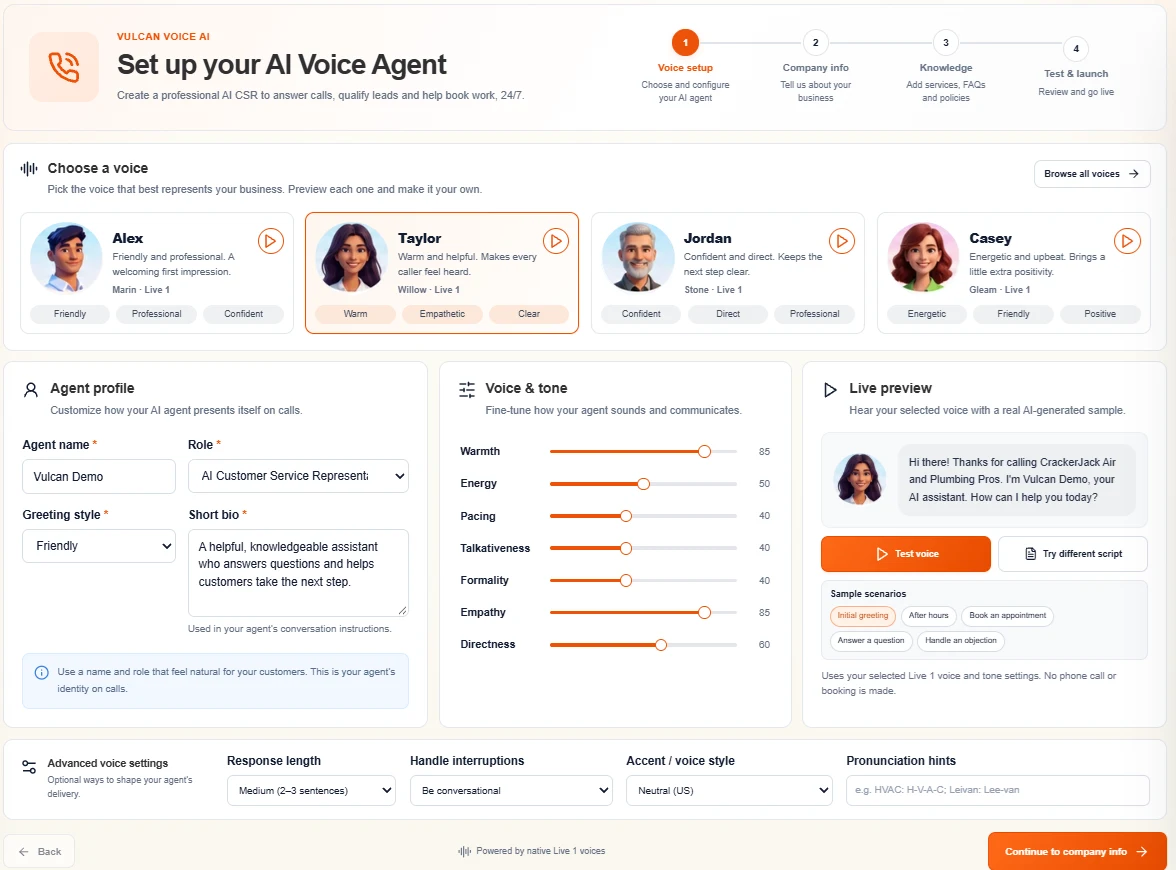
Start with a personality
In Voice setup, Alex uses Marin for a friendly, professional welcome; Taylor uses Willow for a warm, empathetic style; Jordan uses Stone for a confident, direct delivery; and Casey uses Gleam for an energetic, upbeat feel. These are configurable AI personas, not human employees. Browse all voices opens additional choices.
Choose the persona before fine-tuning. Switching a voice can apply that persona's delivery presets, so revisit the sliders after a change. Keep the agent name and short bio simple. A useful role explains the job: help callers with service requests and the next approved step.
What the seven controls mean
| Control | What to listen for |
|---|---|
| Warmth | Reserved versus personable language. |
| Energy | Measured versus lively delivery. |
| Pacing | Comfortable pauses versus a brisker conversation. |
| Talkativeness | Short acknowledgments versus more explanation. |
| Formality | Everyday language versus a more polished register. |
| Empathy | How strongly the agent acknowledges frustration or concern. |
| Directness | Gentle transitions versus getting to the next useful question. |
The 0–100 values are relative conversation preferences, not percentages of accuracy, response time, voice speed or business performance. They guide the model; they do not override verification, safety, full readbacks or booking authority.
Use advanced settings deliberately
Response length offers Short, Medium or Detailed. Medium is a useful starting point for balancing answers and intake. Choose Be conversational for ordinary interruptions or Give extra thinking time for a more patient approach. These preferences do not guarantee an exact pause length.
Accent / voice style offers Neutral (US), the voice's natural accent or Clear international English. Pronunciation hints are for names, local areas and trade terms—for example, “HVAC: H-V-A-C.” Do not hide business instructions in pronunciation notes.
Preview, save, then telephone-test
- Pick Initial greeting, After hours, Book an appointment, Answer a question or Handle an objection.
- Use Test voice; confirm the selected voice and settings in the sample.
- Use Try different script for a brief brand or place-name test. The custom preview script has a 350-character limit.
- Check the audio player, speaker volume and browser playback permission before retrying a silent preview.
- Save your changes, then call the assigned line to evaluate actual two-way behavior.
A generated sample is not a full rehearsal of CRM actions. Also, the sliders on the public product page are an illustration; the controls inside agent setup are the ones that save your configuration.