
VULCAN VOICE / THE FIELD GUIDE
A better front desk.
Start with the know‑how.
Set up your AI CSR. Teach it your business. Choose your coverage. Understand every call and the outcome behind it.


 Your voice. Your business.
Your next step.
CHOOSE YOUR NEXT MOVE
A guide for the job in front of you.
Launching your first agent?
Work through setup, business knowledge and the launch checks.
Open the guideKeeping your people first?
Configure the staff-first backup path and test the handoff.
Open the guideManaging performance?
Read the real KPI definitions and inspect the calls behind them.
Open the guideTHE COMPLETE COLLECTION
Find the answer. Take the next step.
Setup instructions, copyable templates,
test cases and metric definitions.
26 guides
Start here
4 guidesStart here: how Vulcan Voice fits your front desk
Understand agents, phone lines, business knowledge, call routing and verified outcomes before you configure your AI CSR.
Read guideWorkspace owners and administrators3 minSet up your Vulcan Voice agent from start to launch
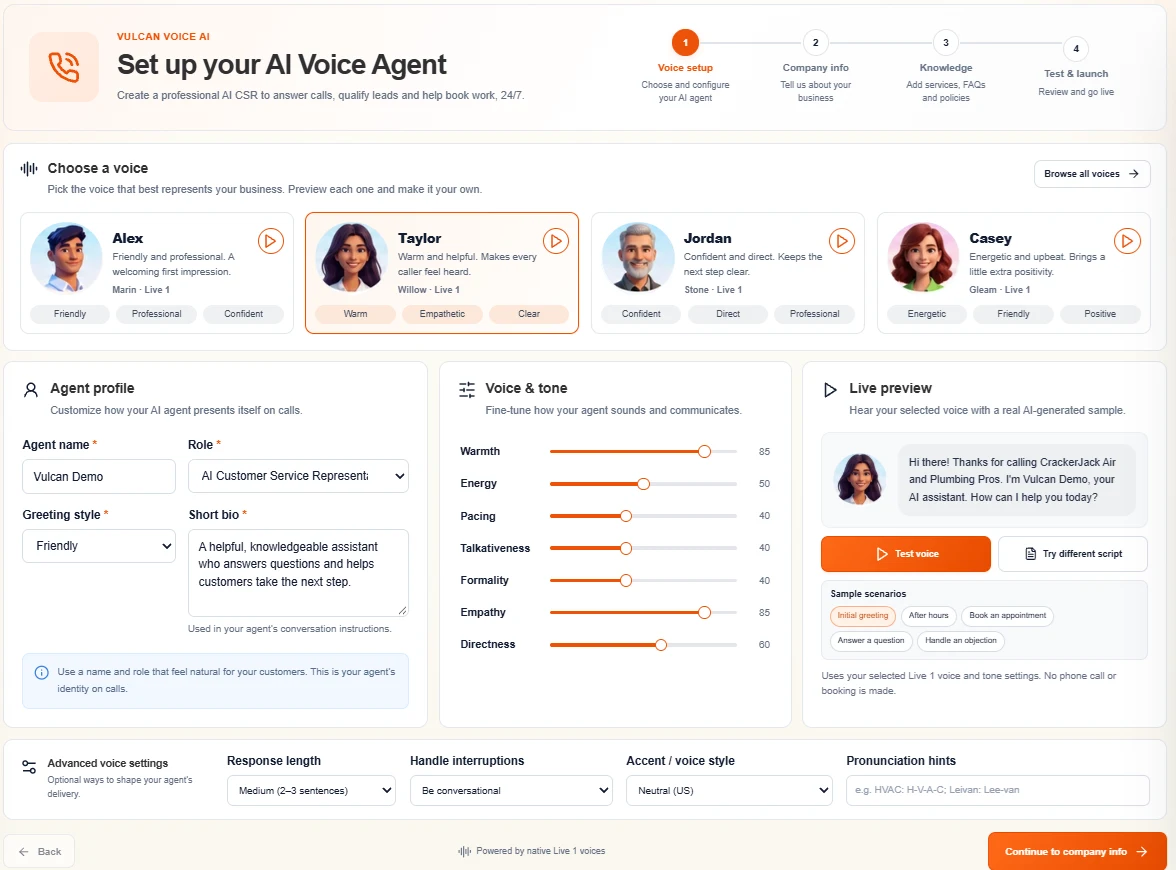
Follow the current four-step wizard: Voice setup, Company info, Knowledge, and Test & launch.
Read guideManagers and agent owners3 minChoose a voice and tune how your agent speaks
Use the four featured personalities, seven tone controls, interruption preferences, pronunciation hints and native audio preview.
Read guideLaunch owners and dispatch managers3 minTest, activate and roll out without surprising your team
Separate voice preview, connection checks, activation, direct-line testing and business-number routing.
Read guideCompany knowledge
4 guidesSet up company information callers can trust
Fill the current company fields, opening greeting, office destination, language and after-hours guidance with a consistent source of truth.
Read guideOffice managers and service leaders3 minDefine services, exclusions and service-area boundaries
Teach the agent which jobs you accept, which requests to decline, and how to handle unclear city or ZIP-code matches.
Read guideAgent owners and trainers3 minTrain your agent with clear business knowledge
Build useful FAQs and instructions, resolve conflicting policies, and improve conversations through controlled edits and retesting.
Read guideOwners, dispatchers and booking managers3 minSet pricing, fees and booking policies that lead to the right outcome
Explain approved prices, appointment expectations, callback paths and restrictions without inventing availability or promises.
Read guideCall coverage
4 guidesUse Vulcan Voice as your first-line CSR
Put AI at the front of the intended call route while keeping qualification, confirmed outcomes and human exceptions under control.
Read guideOffice managers and phone administrators3 minUse Vulcan Voice for backup and overflow answering
Let your people answer first, route busy or unanswered calls to AI, and prevent forwarding loops or competing voicemail.
Read guideOffice managers and on-call coordinators3 minSet up after-hours and holiday answering
Align the real phone schedule with saved office-hours guidance, on-call rules and realistic next-business-day expectations.
Read guideAuthorized supervisors and CSRs3 minTransfer, watch, listen and take over a live call
Understand office transfers, separate monitoring permissions, microphone preparation, human ownership and safe recovery.
Read guideConnected workflows
4 guidesConnect your CRM and understand what can be booked
Choose the current TradeVulcan, Housecall Pro or ServiceTitan path and verify the difference between a request and an appointment.
Read guideServiceTitan administrators and dispatch managers3 minConfigure ServiceTitan booking mappings
Map homeowner phrases to supported job types, business units and campaigns, then validate a complete booking.
Read guideOwners, phone administrators and CSR managers3 minPair Vulcan Voice with Call Spark
Connect AI answering to your phone workspace, human team, call intelligence and follow-up without overlapping ownership.
Read guideWorkspace owners and administrators3 minSet team access, monitoring policy and recording expectations
Separate analytics access, call details, recordings, exports and live supervision so your team can work with the right information.
Read guideDashboards and KPIs
6 guidesUse the Vulcan Voice dashboard and its eight views
Choose an agent, line and date range, drill into calls, and separate saved analytics from live supervision.
Read guideOwners and performance managers4 minKPI reference: what each number means
Learn the actual denominators for calls, verified bookings, captured leads, answer rate, duration and period-over-period changes.
Read guideDispatch managers and reporting owners3 minRead outcomes, verified bookings and cancellation evidence
Distinguish exclusive call dispositions from overlapping summary metrics and understand appointment, job and attribution counts.
Read guideOwners and CSR managers3 minCompare AI and human performance without misleading conclusions
Understand initial handler, AI-assisted handoffs, unavailable human-first coverage and fair comparisons.
Read guideMarketing, operations and staffing managers3 minUse call sources, service topics and peak-time reporting
Find when calls arrive and what they concern, while keeping attribution gaps separate from phone handling.
Read guideAuthorized managers, trainers and analysts3 minFind recordings, read transcripts and export call history
Search call records, distinguish missing audio from restricted access, and export the full filtered cohort safely.
Read guideImprove and troubleshoot
4 guidesBest practices for natural conversations and better outcomes
Build a practical review rhythm for questions, interruptions, corrections, lead quality and accountable follow-up.
Read guideAgent owners and support teams3 minTroubleshoot setup, audio, routing and dashboard issues
Find the failing stage before retrying: saved configuration, preview audio, assigned number, phone routing, CRM result or reporting scope.
Read guideAgent owners and office managers3 minCopyable company knowledge and training templates
Adapt practical field-by-field templates for your business profile, FAQs, fees, booking, after-hours coverage and review log.
Read guideLaunch owners, CSRs and trainers3 minRun the launch and regression test call checklist
Rehearse common requests, interruptions, corrections, exclusions, handoffs and booking failures with explicit pass criteria.
Read guideFROM KNOWLEDGE TO CONFIDENCE
Test the conversation.
Verify the outcome.
Use the call checklist before launch and after meaningful changes. Keep your agent, phone route and office process working together.