
Start with the saved status
Confirm the workspace, website name, page and current revision. Read the exact message in the relevant task, Billing, Domains or publication view. Take one diagnostic step at a time. Do not solve every issue by creating another website, buying more credits, changing DNS or repeating a request.
I cannot create or open a website
Ask the workspace owner to confirm Web Spark availability, your app assignment and the website lifecycle. A user can have viewing access without generation, billing or publication rights. Opening a product marketing page does not establish dashboard access. Do not share accounts or bypass a permission message.
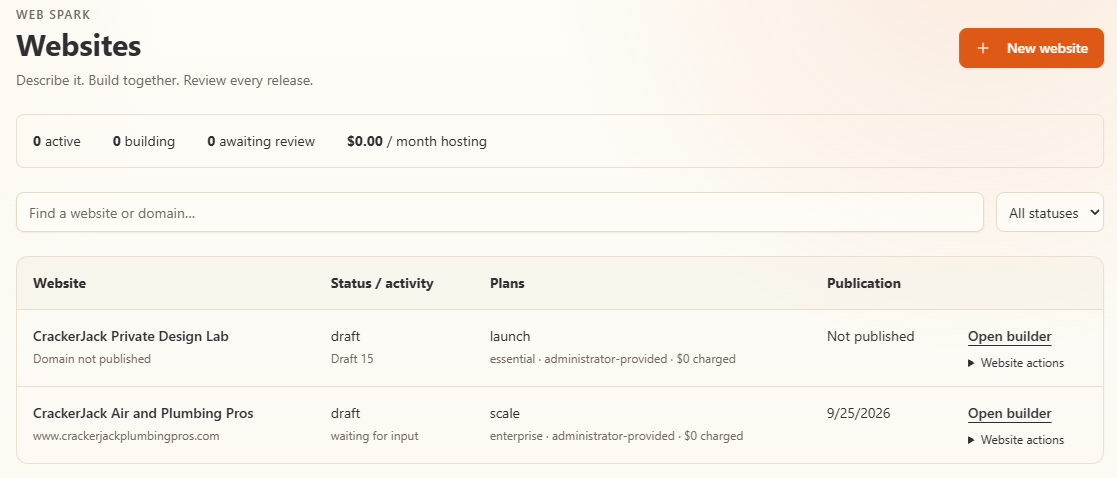
Use Open builder for the correct website. Status, plan, and administrator-provided access labels in this example are not standard plan entitlements.
An agent says Needs attention or a page is blocked
Open the associated question, task or review finding. Resolve missing evidence, an unanswered decision or required approval. Check whether the task depends on other work. An available or idle agent is not necessarily broken, and an answered question does not prove downstream work has finished.
Give a specific answer to the current question. If it concerns which sections may change, identify them and preserve the unaffected sections explicitly.
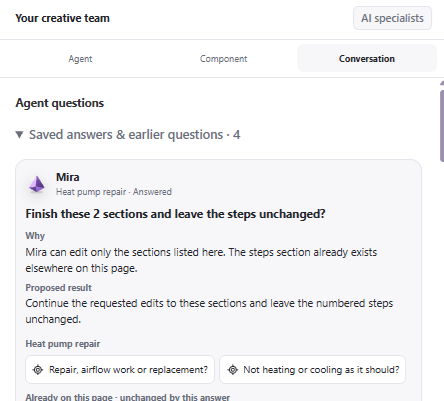
Open the question to review its reason and exact scope before answering. This is a detail crop of the supplied Studio capture.
Generation or image work has stopped
Check current usage, reservations, the task outcome and any permission or approval requirement. Page-generation capacity and AI-service credit are not the same thing. If a provider operation is pending or unknown, retain its reference and contact support before trying again. A repeated prompt can make the status harder to interpret.
The preview looks blank, old or different
Check the selected page, saved version, device width, zoom and whether you are in a replay or history view. Reopen the current project to obtain a fresh private preview if necessary. Confirm an image belongs to the project and that its saved asset is available.
The public website may intentionally show the earlier approved release while the builder shows a newer draft. Compare the release status before diagnosing that difference as a bug. Do not use a private preview URL as a permanent public website link.
I see a newer-version or stale-question warning
Copy unsaved text you need, then load the current inputs or page through the displayed recovery action. Recheck the current question and scope. Do not overwrite another user’s newer saved work or approve an obsolete target just to dismiss a warning.
Payment completed but the project is not ready
Return to the same website’s Billing view and inspect the order. Check for required authentication, asynchronous settlement or an unresolved operation. Payment confirmation, generation completion, hosting activation and domain registration are different outcomes. Do not pay again until the first order has been reconciled.
A form, booking path or proof component is missing
Confirm the source Site Spark or Proof Pulse deployment is enabled, available to the same workspace and bound to the correct live origin. After a domain change, inspect the future-origin approval and new release. Test the public journey with permission and confirm the result in the source app, not only in the preview.
The domain or certificate is pending
Compare the actual DNS records with the values shown for this project. Ownership TXT records, certificate validation and website routing have different purposes. Check the exact hostname, including www where applicable. Preserve email and unrelated records. A pending or unknown registrar action needs reconciliation before another paid request.
Publication did not finish, or the site is unavailable
Inspect the candidate, required reviews, hosting status, selected domain, certificate and last publication operation. Check whether the project is paused, archived or restricted. A saved approval is not a live receipt. After resolving a hosting lapse, prepare a fresh republication rather than replaying an old approval.
The public broadcast is not showing my latest edit
The public broadcast presents selected saved website previews. It is not a mirror of every private project and does not expose your private Studio controls. Use your builder for editing and the viewer’s status for what is being presented. Do not interpret a saved-preview presentation as proof of continuous generation.
Send a useful support request
Include the project name, affected page, time and timezone, exact message, task/order/release reference, browser and steps already tried. Add a redacted screenshot when helpful. Do not include passwords, API keys, payment details, transfer codes, private preview tokens or customer personal information.
Use TradeVulcan support to investigate persistent failures. For customer-facing changes, keep the last working site available where possible and avoid unreviewed destructive fixes.